


While you’ve been researching buying a PC you’ve probably come across references to form factor and case size. The great news is that if you’re buying a complete refurbished desktop PC then you don’t need to worry too much about the details. Just make sure you have space for the computer that you’ve chosen and you’re good to go.
What is Form Factor? | What About the Computer Case? | Motherboard Form Factors | Choosing the Right Case | So Which is Right for Me?
What is Form Factor?
It’s important to understand the difference between form factor and size. A form factor is a defined standard that a component adheres to. When talking about computers, this usually refers to the motherboard. The motherboard is like the foundation of your PC. It ties all the other components together, and allows them to communicate with one another. There are four main motherboard form factors:
● Mini-ITX (mITX)
● Micro-ATX (mATX)
● ATX
● Extended ATX (eATX)
As well as the size of the motherboard, the form factor also specifies other elements like the placing of expansion slots, power requirements and how the board is mounted to the case.v
What About the Computer Case?
It’s important to understand the difference between form factor and size. A form factor is a defined standard that a component adheres to. When talking about computers, this usually refers to the motherboard. The motherboard is like the foundation of your PC. It ties all the other components together, and allows them to communicate with one another. There are four main motherboard form factors:
● Mini-ITX (mITX)
● Micro-ATX (mATX)
● ATX
● Extended ATX (eATX)
As well as the size of the motherboard, the form factor also specifies other elements like the placing of expansion slots, power requirements and how the board is mounted to the case.
Motherboard Form Factors
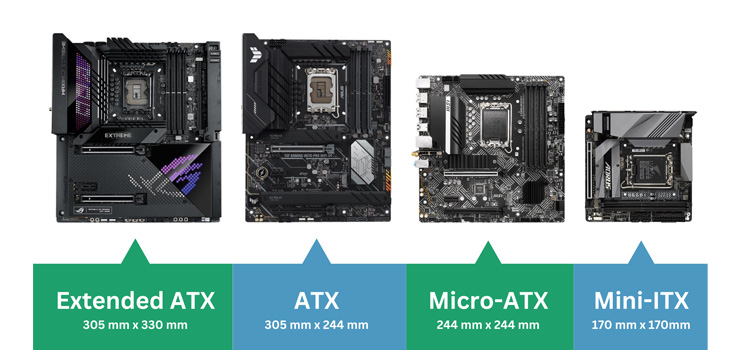
First up, let’s look at the four form factors for motherboards on the market today. There are others, but these are by far the most common. Each type is a different size, and has its own unique pros and cons.
You can see in the graphic above the approximate scale of each type of motherboard. Please bear in mind that this is not to scale, and is only intended to give an idea of the size differences. Also note that while there may be some small differences in the precise measurements of any given motherboard the mounting points will be identical in every case.
ATX Motherboards
Measuring 305 mm x 244 mm, ATX (which stands for Advanced Technology eXtended) is easily the most common motherboard form factor around. It was introduced by Intel in 1995, and although the technology on the board has evolved almost beyond recognition, the shape itself hasn’t changed. That means if you have an ATX compatible case from the last millennium and you want to pop a modern motherboard in there you can, with no modification needed.
You’ll get plenty of slots and ports for expansion on an ATX form factor motherboard. Generally you can expect 4 slots for RAM, and up to 7 PCI Express slots. There will be lots of options for adding storage too, with most modern boards having around 6 SATA ports and a couple of M.2 slots too.
For most users this will be far more than you need. A decent gaming PC needs a GPU (1 PCI Express slot), a 1 TB M.2 drive and 16 GB of RAM. That leaves plenty of room to expand if you ever want to.
Gone are the days when PCs were packed with multiple hard drives, DVD burners, sound cards, network cards and more. Nowadays much of what you need is built into the motherboard’s chipset, and most components are much smaller too.
If you’re happy to have a bigger case taking up space, then an ATX motherboard is a good bet for your PC. Because they are so popular there is a huge range to choose from, and that means a huge range of prices and specifications too.
Micro ATX Motherboards
Micro ATX MotherboardsMeasuring 305 mm x 244 mm, ATX (which stands for Advanced Technology eXtended) is easily the most common motherboard form factor around. It was introduced by Intel in 1995, and although the technology on the board has evolved almost beyond recognition, the shape itself hasn’t changed. That means if you have an ATX compatible case from the last millennium and you want to pop a modern motherboard in there you can, with no modification needed.
You’ll get plenty of slots and ports for expansion on an ATX form factor motherboard. Generally you can expect 4 slots for RAM, and up to 7 PCI Express slots. There will be lots of options for adding storage too, with most modern boards having around 6 SATA ports and a couple of M.2 slots too.
For most users this will be far more than you need. A decent gaming PC needs a GPU (1 PCI Express slot), a 1 TB M.2 drive and 16 GB of RAM. That leaves plenty of room to expand if you ever want to.
Gone are the days when PCs were packed with multiple hard drives, DVD burners, sound cards, network cards and more. Nowadays much of what you need is built into the motherboard’s chipset, and most components are much smaller too.
If you’re happy to have a bigger case taking up space, then an ATX motherboard is a good bet for your PC. Because they are so popular there is a huge range to choose from, and that means a huge range of prices and specifications too.
Mini ITX Motherboards
Measuring a tiny 170 mm x 170 mm, Mini ITX (mITX) was introduced in 2001. The mounting holes are the same as 4 of the holes on an ATX motherboard, and all of the expansion slots and backplates line up too, so it’s possible to fit an mATX motherboard to a case designed for ATX or mATX with no issues.
The real benefit of the mITX form factor is that it can fit into a much smaller space than other motherboard standards. This makes mITX ideal for PCs where space is limited, like home cinema PCs or desktop computers that need to be slotted away out of sight.
You’ll be much more limited for expansion options with mITX. mITX motherboards have a maximum of 2 RAM slots, and a single PCI-E slot, not to mention fewer SATA and M.2 ports for storage.
That’s not to say that mITX is no use for more powerful applications like gaming PCs. With the right case there’s still room for a GPU and plenty of RAM, but you’ll have to balance the space saving with the limited expandability.
There are smaller motherboards on the market (such as Nano- and Pico-ITX) but these are much less common and more specialist, often using unusual processors and components.
Extended ATX Motherboards
Extended ATX (or eATX) (measuring 305 mm x 330 mm) is a bigger version of the standard ATX size boards, with even more room for expansion. Boards are much less common (and usually more expensive) but for some specific use cases the extra slots can be invaluable.
eATX motherboards sometimes (but not always) double the number of RAM slots to 8, and have a higher maximum memory ceiling (meaning that the chipset can handle more RAM). Most current ATX boards are limited to 64 GB; eATX motherboards often allow up to 128 GB. You’ll get more SATA and M.2 ports, and more PCI Express slots too.
But unless you really need all that space and power you’re probably better off with a good quality ATX build. You can then put more of your budget towards better CPU, GPU and RAM - or a few games to get you started!
eATX motherboards will also need a bigger case than ATX. Some standard towers will fit but not all. You also won’t find many pre-built PCs with eATX cases.
Choosing the Right Case
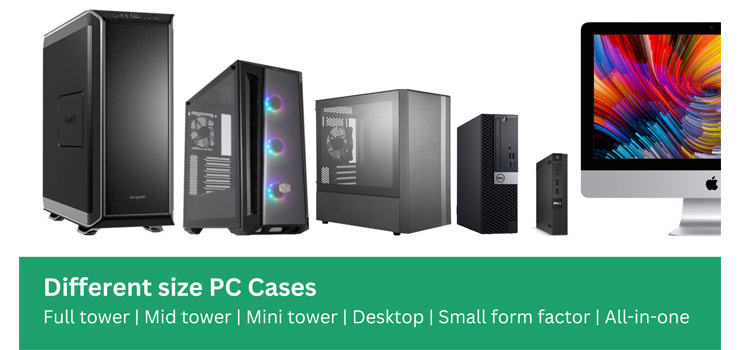
Motherboards have a form factor with specific standards that they must adhere to; cases don’t. They’re built to house boards and will have standard features, but they can actually vary greatly in both size and shape. There are a few common shapes and styles of PC case, each with their own advantages and disadvantages.
Full Tower
If space is no issue, and you want the ultimate in expandability and power, then you need a full tower computer case. These beasts will comfortably fit an eATX motherboard, 3 or 4 graphics cards and as much storage as you could ever need… Probably more. They’ll also have space for the biggest and best cooling system, whether that’s massive fan arrays or triple radiator water cooling.
Full tower cases are also huge. And unless you have a really specific need for multiple graphics cards and RAID storage arrays, all that space is probably going to be overkill.
Mini Tower
If you need a small PC that doesn’t compromise too much on performance then something built into a mini tower case will probably be ideal. Usually designed around mATX motherboards, mini tower computer cases have all the space you need for a powerful PC.
With the right case you’ll be able to fit a full size graphics card, plenty of RAM, a SATA SSD and a good cooling system - all in a much smaller space than you’ll need for even a mid tower. You won’t be able to add much later - but if you want a gaming PC to tuck away in the living room or you’re confident you won’t need to expand much in the future then that might not matter.
Desktop
Desktop PC cases - designed to sit with a monitor on top - were once the standard shape, when monitors were huge, heavy CRTs. Since the introduction of lightweight flatscreen technology, which can be mounted in a range of ways, they have become less popular. But for certain uses, they can still be the best solution.
Desktop cases are usually designed for mATX or mITX motherboards, and are slimmer than tower cases. This means that full size graphics cards will almost certainly not fit. But for a lower-spec home office or general use PC that doesn’t need the latest in GPU power, they can be a great way to save on space.
Many desktop cases can also be stood vertically like a super-slim tower. This makes them really versatile if your space is limited.
Small Form Factor (SFF)
There are a whole range of different shapes and sizes of smaller PC cases, designed to slot into tight spaces. These are generally designed around mITX form factor motherboards and will have very limited space for components like large GPUs.
Small form desktop and mini tower cases are much like their larger counterparts, but take up much less space. They are also substantially slimmer, which can make for a much smaller footprint - but really limits expansion opportunities, especially when it comes to graphics cards. If space is limited and you’re not planning to play power-hungry games, then these can be a great option.
Ultra Small Form Factor (USFF)
If you need something really tiny - perhaps to pop into a cupboard or on the back of your TV as a media PC - then an ultra small form factor computer is just the ticket. These are still built around a proper CPU and will run Windows natively (some super-small PCs use strange proprietary CPUs and are much less flexible) so will do everything a low-spec bigger PC will - just in a much smaller space. They often use passive cooling too, so there’s no noisy fan to distract you.
All In One PC (AiO)
As well as computers in separate cases, you can also buy all-in-one PCs, which house all of the components in a slightly expanded monitor casing. These are brilliant if you need something to sit on a desktop but are really restricted for space, and can sometimes even be wall-mounted. There will probably be no space inside for expansion however, beyond the option to swap out RAM or SSDs for larger versions - and even this is not always possible. Apple iMacs are a popular choice for all-in-one PCs, but there are Windows based options available too.
So Which is Right for Me?
There’s no one-size-fits-all solution for what type of PC is right for you - it all depends on the space you have, and what you want to use it for.
If you want to play up-to-date games, then you’re going to need a reasonably big case, with a motherboard that allows for the combination of components - especially GPU - that you need. A larger case will give you space to upgrade, too.
For more everyday use - like a home office setup, or for doing homework and streaming movies and TV on - you’ll probably be fine with a smaller form factor, to cut down on clutter. You might even prefer an all-in-one device, as long as you’re confident you won’t need to upgrade in the future.
And if you want a media PC - or something really unobtrusive - then a really tiny form factor is probably right for you.
At the other end of the scale, if you need a computer with huge RAID arrays, or multiple graphics cards for rendering or gaming (though we’d question the need for gaming with modern tech) then you might need something built in a full tower, with a big motherboard to house all of your components.
If you’re not sure then you can always get in touch with our team of experts - they’ll be happy to talk through your requirements, and suggest some options.
 RSS Feed